
Vendor Scorecard
$15 Watch the walkthrough1:56
Watch the walkthrough1:56
Watch the walkthrough1:56
- Excel workbook
- Opens in Google Sheets
- 6 tabs
Vendors rarely fail in one dramatic moment. They drift. A date moves a week, a status report gets thin, a question takes three days to answer. A scorecard turns that drift into a number you can see and discuss before it becomes a crisis.
This workbook scores each vendor from 1 to 5 on six weighted criteria every review period. It converts the scores to a rating (Strategic, Preferred, Watch or Escalate), compares them with the prior period, and flags the vendors who need action. Use it in the biweekly vendor review and bring the Dashboard to steering.
- Scorecard. One row per vendor per period, scored on six criteria with a comment that cites the evidence. Weighted score, rating and trend calculate.
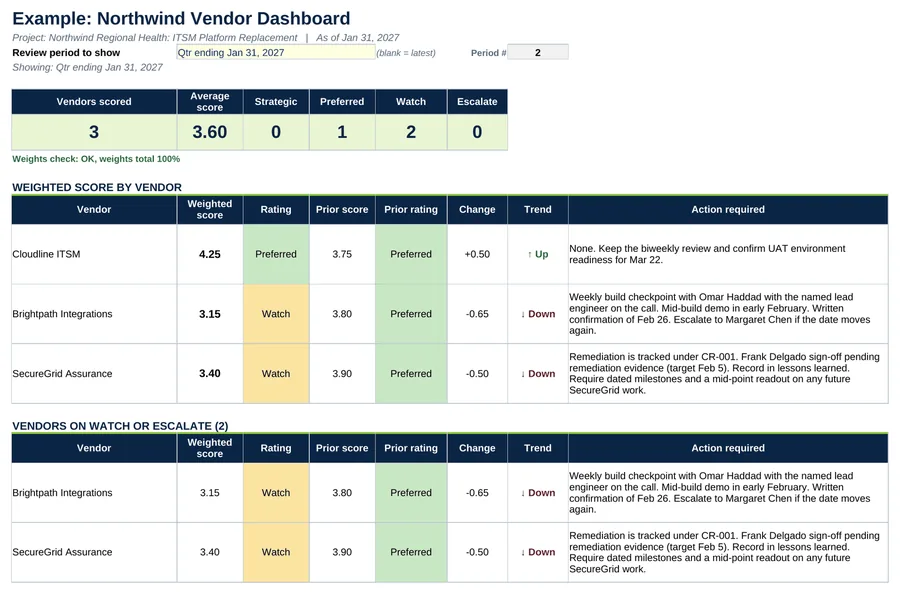
- Dashboard. Pick a period to see the ranking, trend arrows, the Watch and Escalate list and the weighted score chart.
- Settings. Six criteria and weights with a 100% check, rating bands, up to 8 vendors and up to 6 review periods.
Also included in Complete Toolkit ($99), Tracking and Control Pack ($49), Money and Scope Control Kit ($39).
Includes a How to Use guide tab. The green Example tabs stand alone and can be deleted. Licensed for use by the individual purchaser on their own projects.
See the Vendor Scorecard in action
A quick tour of the workbook, narrated by Cassandra Taylor, PMP: what goes in, what calculates for you and what the dashboard shows.
Read the transcript
Vendors rarely fail in one dramatic moment. They drift. A date moves a week, a status report gets thin, a question takes three days to answer. A scorecard turns that drift into a number you can see.
I'm Cassandra Taylor, and this is the Vendor Scorecard. One workbook, in Excel or Google Sheets, that scores every vendor, every review period.
Each vendor is scored from one to five on six weighted criteria. Timeliness and quality count the most, 25% each. Then communication, cost, risk, and responsiveness. The weights are yours to change, and they must total 100%.
Score with evidence. A three is not a polite four. Brightpath announced a six-week slip with one week of notice, so timeliness is a two. The fixed fee held, so cost is a five.
The workbook weights the scores and sets the rating. Strategic from four and a half. Preferred from three and a half. Watch from two and a half. Below that, Escalate. Brightpath lands at three fifteen, down from three eighty, so it goes on Watch.
The Dashboard ranks your vendors, shows the trend, and lists every Watch and Escalate with its action. Here, Cloudline is up to four twenty-five. Brightpath and SecureGrid are both on Watch, each with a named action. A Watch with no action is just a label.
You're the conductor of the orchestra. I stay ready, so I don't have to get ready, right? Add the Vendor Scorecard to your cart, and catch the drift before it becomes a crisis.
What's inside
Tabs
How to Use, Dashboard, Scorecard and Settings, plus Example Dashboard and Example Scorecard.
Worked example
The three Northwind vendors for the quarter ending Jan 31, 2027, with the prior quarter for trend.
Score with evidence
Anchor each score to something that happened: a date missed, a defect count, an invoice error.