
Budget Tracker
$19 Watch the walkthrough1:34
Watch the walkthrough1:34
Watch the walkthrough1:34
- Excel workbook
- Opens in Google Sheets
- 8 tabs
A budget is a promise. The tracker tells you, every month, how much of the promise you have already spent, how much you have committed but not yet paid, and how much you can still move. Most projects do not run out of money in one big bang. They leak a little each month.
This workbook keeps one row per budget line and one grid for what was actually paid. You type actuals once, by line and month, and the Budget tab and Dashboard update themselves. Flags warn you when a line is nearing its limit, and the contingency block shows what is left of your reserve.
- Budget. Line name, category, baseline, approved changes and commitments. Revised budget, actual to date, remaining, percent spent, unpaid commitments and uncommitted (available) calculate on their own.
- Monthly Actuals. An 18-month grid of what was paid or accrued for each line, starting from the first month you set.
- Flags. Over budget, Over-committed, Watch and Fully spent.
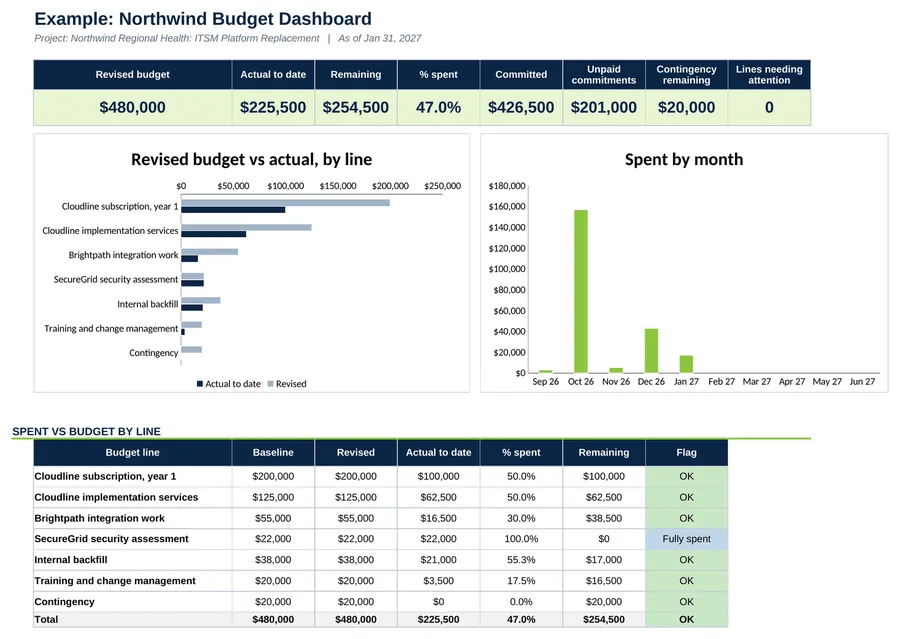
- Dashboard. Totals, burn by month, spent against budget by line, and the contingency left.
Also included in Complete Toolkit ($99), Tracking and Control Pack ($49), Money and Scope Control Kit ($39).
Includes a How to Use guide tab. The green Example tabs stand alone and can be deleted. Licensed for use by the individual purchaser on their own projects.
See the Budget Tracker in action
A quick tour of the workbook, narrated by Cassandra Taylor, PMP: what goes in, what calculates for you and what the dashboard shows.
Read the transcript
Projects rarely run out of money in one big bang. They leak a little each month, until a CFO asks a question you can't answer.
I'm Cassandra Taylor, and this is the Budget Tracker. One workbook, in Excel or Google Sheets, that shows what you've spent, what you've committed, and what you can still move.
Start on the Budget tab, one row per line. Add the baseline, any approved changes, and what you've committed in contracts. Revised budget, remaining, and percent spent calculate on their own.
Then type what was actually paid, by line and month. That grid is the only place you enter actuals.
Here's your early warning. A line can look half spent and already be fully committed. The flags catch it: over budget, over committed, or nearing the limit.
Contingency gets its own block, so you always know what's left of your reserve, and whether it's healthy or low.
Your Dashboard pulls it together. Totals, spent against budget by line, burn by month, and contingency left. A worked example is included, so you can see what finished looks like.
You're the conductor of the orchestra. I stay ready, so I don't have to get ready, right? Add it to your cart and enter your first budget line today.
What's inside
Tabs
How to Use, Dashboard, Budget, Monthly Actuals and Settings, plus three Example tabs.
Worked example
The Northwind budget as of Jan 31, 2027: $480,000 baseline, $225,500 spent, contingency untouched.
Contingency
Moving money out of contingency is a negative amount on the contingency line and a positive amount on the line that receives it.