
Business Case
$19 Watch the walkthrough1:35
Watch the walkthrough1:35
Watch the walkthrough1:35
- Excel workbook
- Opens in Google Sheets
- 10 tabs
A business case answers one question for the people who hold the money: is this worth doing, and is it worth doing this way? Most weak cases fail the same way. The numbers are scattered, the assumptions are hidden, and nobody can tell what would change the answer.
This workbook keeps every number in one place. You enter the investment, the benefits, the run costs and the ramp once on the Inputs tab. The Cash Flow tab turns them into NPV, IRR, payback, ROI and a benefit-cost ratio with live formulas, and the Options tab scores the alternatives, including doing nothing, against the same yardstick.
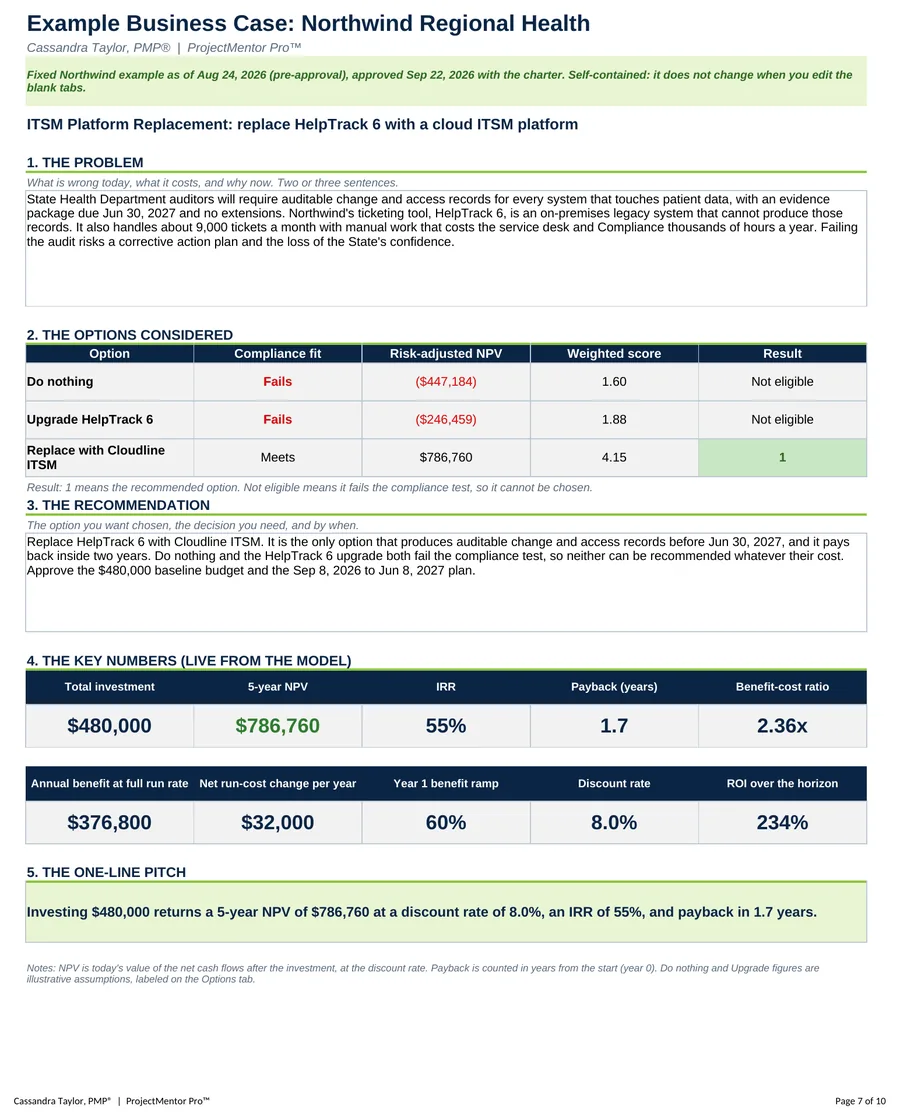
- Case Summary. Type the problem and the recommendation, and the key numbers fill in by formula. Print it as one page for your sponsor.
- Inputs. Every one-time cost on its own line, benefits with the hours saved and loaded rate behind them, run-cost changes by year, the benefit ramp and the discount rate.
- Cash Flow. NPV, IRR, payback, ROI and the benefit-cost ratio over a 5-year horizon, with a cash flow chart.
- Options. Describe each option, label the source of every figure, and score risk, compliance fit and delivery ease. An option that fails the compliance test cannot be recommended.
- Settings. Project name, horizon and the decision weights your sponsor uses.
Also included in Complete Toolkit ($99), Initiation and Planning Pack ($49), Project Kickoff Kit ($35).
Includes a How to Use guide tab. The green Example tabs stand alone and can be deleted. Licensed for use by the individual purchaser on their own projects.
See the Business Case in action
A quick tour of the workbook, narrated by Cassandra Taylor, PMP: what goes in, what calculates for you and what the Case Summary shows.
Read the transcript
Most business cases fail the same test. They never put a number on doing nothing.
I'm Cassandra Taylor, and this is the Business Case. One workbook, in Excel or Google Sheets, that answers your sponsor's question: is this worth doing, and is it worth doing this way?
Start on the Inputs tab. List every one-time cost, then the benefits, with the hours saved and the rate behind each one, so a skeptic can check your math.
Add what it costs to run, and be honest about the ramp. Year one is rarely 100%.
The Cash Flow tab does the math. Net cash flow, payback, net present value, and internal rate of return, all from the numbers you entered once.
Then frame the options, and put a number on doing nothing. Here, doing nothing and the upgrade both fail the compliance test, so neither can be recommended, whatever it costs.
Your Case Summary turns it into one page for your sponsor. The problem, the options, the recommendation, and key numbers live from the model. Even the one-line pitch writes itself.
You're the conductor of the orchestra. I stay ready, so I don't have to get ready, right? Add it to your cart and make your first business case today.
What's inside
Tabs
How to Use, Case Summary, Inputs, Cash Flow, Options and Settings, plus four Example tabs.
Worked example
The Northwind business case, a fixed snapshot as of Aug 24, 2026. Trace each headline number from the Example Case Summary back to the Example Inputs.
How the measures work
The How to Use tab explains how NPV, IRR, payback, ROI and the benefit-cost ratio are calculated, and three common misses.