
Dependency Map
$12 Watch the walkthrough1:54
Watch the walkthrough1:54
Watch the walkthrough1:54
- Excel workbook
- Opens in Google Sheets
- 8 tabs
Projects rarely fail on the work you control. They fail on the work you are waiting for: the vendor environment, the sign-off, the specification, the staff released for training. If you cannot name it, date it, and put one person on it, you are hoping, not managing.
This workbook keeps two lists side by side. Inbound dependencies are what others owe you. Outbound dependencies are what you owe others, and they are the ones teams forget. The Dependency Map shows who is waiting on whom, and a critical list surfaces the external items that are slipping or about to be needed.
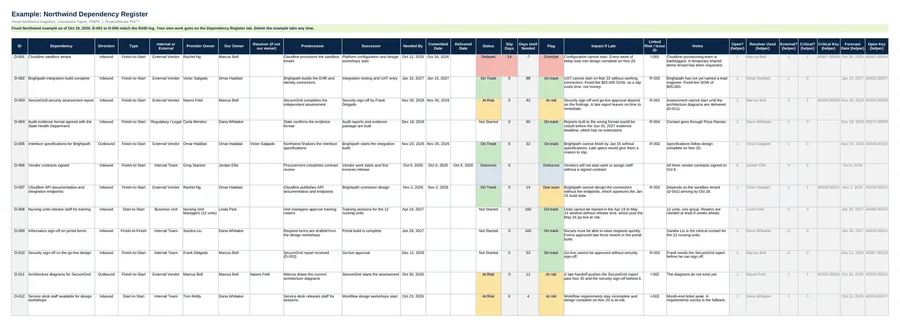
- Dependency Register. Provider, our owner, receiver, type, needed-by and committed dates. Slip days, days until needed and the flag (Overdue, Slipping, At risk, Due soon, On track or Delivered) calculate on their own.
- Dependency Map. A grid of up to 12 people and groups showing who is waiting on whom, plus the critical list.
- Dashboard. Dependency counts, flags and charts on one tab.
- Settings. Status date, project name, the people and groups list, the critical window and the dependency type definitions.
Also included in Complete Toolkit ($99), Initiation and Planning Pack ($49).
Includes a How to Use guide tab. The green Example tabs stand alone and can be deleted. Licensed for use by the individual purchaser on their own projects.
See the Dependency Map in action
A quick tour of the workbook, narrated by Cassandra Taylor, PMP: what goes in, what calculates for you and what the dashboard shows.
Read the transcript
Projects rarely fail on the work you control. They fail on the work you are waiting for. A dependency is anything outside your team that must arrive before your work can move. If you cannot name it, date it, and put one person on it, you are hoping, not managing.
I'm Cassandra Taylor, and this is the Dependency Map. One workbook, in Excel or Google Sheets, that shows who is waiting on whom.
Keep two lists side by side. Inbound is what others owe you. Outbound is what you owe others, and those are the ones teams forget. Each gets a provider, an owner, and a needed-by date.
Add the date the provider commits to in writing. The workbook compares it to the needed-by date, and flags each item Overdue, At risk, Due soon, or On track. The Cloudline sandbox was needed October 12, is committed for the 26th, and is fourteen days late.
The map shows who waits on whom. Providers run down the side, receivers across the top, and darker means more. Here, Marcus Bell and Dana Whitaker are each waiting on three things.
The critical list shows what to chase this week. Open, external items that are slipping, or needed within fourteen days. Four qualify here, and each one links to a risk or an issue.
You're the conductor of the orchestra. I stay ready, so I don't have to get ready, right? Add the Dependency Map to your cart, and name every dependency today.
What's inside
Tabs
How to Use, Dependency Register, Dependency Map, Dashboard and Settings, plus three Example tabs.
Worked example
12 dependencies from Northwind Regional Health. The first six match the RAID log.
Dependency types
Finish-to-Start, Start-to-Start, Finish-to-Finish and Start-to-Finish, explained in plain words.