
Acceptance Criteria Checklist
$12 Watch the walkthrough2:05
Watch the walkthrough2:05
Watch the walkthrough2:05
- Excel workbook
- Opens in Google Sheets
- 8 tabs
A project is not done when the work is finished. It is done when the people who asked for it agree it works. Acceptance criteria are how you agree, in advance, what working means.
This workbook holds every criterion, the evidence you need, who tested it, what happened and who accepted it. A second tab rolls the open items into a go-live readiness score and a plain recommendation: Go, Go with conditions, or No-go. Use it from UAT entry through go-live.
- Acceptance Criteria. Tie each requirement to a WBS area, write a testable criterion, name the evidence, record the result, tester, date, defect reference and who accepted it. Status and days since test calculate.
- Go-Live Readiness. Every item that must be true before switch-over, with category, owner, status and a go/no-go weight. Gate items are weighted Critical.
- Recommendation. Each item earns credit by status times its weight points. No-go if the score is below the No-go line or a Critical item is at risk, blocked or not started.
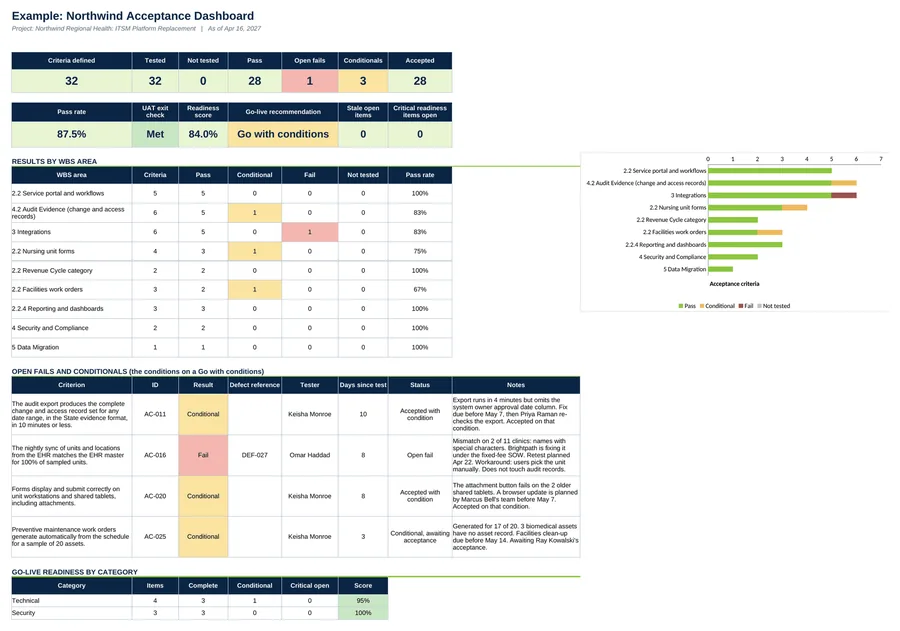
- Dashboard. Pass rate, open fails, conditionals, readiness score, the recommendation and results by WBS area.
Also included in Complete Toolkit ($99), Change and Governance Pack ($19).
Includes a How to Use guide tab. The green Example tabs stand alone and can be deleted. Licensed for use by the individual purchaser on their own projects.
See the Acceptance Criteria Checklist in action
A quick tour of the workbook, narrated by Cassandra Taylor, PMP: what goes in, what calculates for you and what the dashboard shows.
Read the transcript
A project is not done when the work is finished. It is done when the people who asked for it agree it works. Acceptance criteria settle that argument before it starts.
I'm Cassandra Taylor, and this is the Acceptance Criteria Checklist. One workbook, in Excel or Google Sheets, that takes you from user testing to a go live decision.
Write each criterion so a tester can answer pass or fail. Put the number in it. Three minutes or less. Fourteen test categories. 100% of sampled units. Then name the evidence you will keep. If a criterion cannot fail, it cannot pass.
Test and record. Pick Pass, Fail, or Conditional. A Fail stays open until you retest. A Conditional needs a named condition, an owner, and a date. And the person who asked for it accepts it, never the developer who built it.
The Go Live Readiness tab is the checklist. Twenty items, six categories, each with a status and a weight. Critical items are the gates. Complete earns full credit, Conditional 75%, On track half. The score is credit earned over points possible.
The Dashboard rolls it up. Northwind finished testing at 87.5%, so the exit check is met. But readiness is 84%, under the 90% Go line. No critical item is open, so it is not a No go. The answer is Go with conditions, and every condition has an owner and a date.
You're the conductor of the orchestra. I stay ready, so I don't have to get ready, right? Add the Acceptance Criteria Checklist to your cart, and make done mean something.
What's inside
Tabs
How to Use, Dashboard, Acceptance Criteria, Go-Live Readiness and Settings, plus three Example tabs.
Worked example
32 acceptance criteria and a 20-item go-live checklist from Northwind at the end of UAT on Apr 16, 2027. The result is Go with conditions.
Three common misses
Criteria nobody can fail, developers accepting their own work, and treating Conditional as Pass.