
Forecast Worksheet
$19 Watch the walkthrough1:46
Watch the walkthrough1:46
Watch the walkthrough1:46
- Excel workbook
- Opens in Google Sheets
- 8 tabs
A budget tells you what you planned to spend. A forecast tells you where you will actually land. The gap between the two is the conversation your sponsor and your CFO want to have early, while there are still options.
This workbook builds the forecast bottom-up. For each line you take what has already been spent, add your honest estimate of what is left, and compare the result with the budget. A CPI cross-check tests whether your estimate is too hopeful, and a Scenarios tab shows the plan, the plan with a change request, and a worst case side by side.
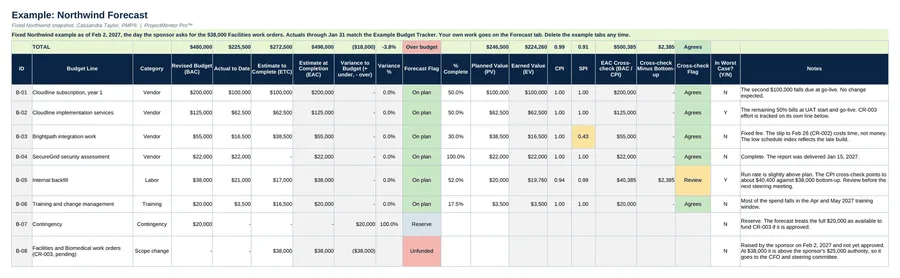
- Forecast. Budget, actual to date, estimate to complete, percent complete and planned value. EAC, variance to budget, earned value, CPI, SPI and the cross-check calculate on their own.
- CPI cross-check. If the cross-check differs from your bottom-up EAC by more than your tolerance, the line says Review.
- Scenarios. Plan, plan with a change request, and worst case, with the impact on contingency and new funding.
- Dashboard. Budget against estimate at completion by line, EAC by scenario and charts.
- Approval route. Contingency covers an overrun first. Whatever is left over is new funding, routed to the Project Manager, Sponsor or CFO and steering committee by the limits on Settings.
Also included in Complete Toolkit ($99), Tracking and Control Pack ($49), Money and Scope Control Kit ($39).
Includes a How to Use guide tab. The green Example tabs stand alone and can be deleted. Licensed for use by the individual purchaser on their own projects.
See the Forecast Worksheet in action
A quick tour of the workbook, narrated by Cassandra Taylor, PMP: what goes in, what calculates for you and what the dashboard shows.
Read the transcript
A budget tells you what you planned to spend. A forecast tells you where you will actually land. Raise that gap early, while you still have options.
I'm Cassandra Taylor, and this is the Forecast Worksheet. One workbook, in Excel or Google Sheets, that builds your forecast line by line and shows what happens when something changes.
For each line, take what you've already spent, then add an honest estimate of what's left. Ask the person doing the work. Don't just subtract. The workbook adds them up and shows your variance.
Add percent complete and planned value, and the worksheet cross-checks your estimate using cost performance. When the two disagree by too much, the line says Review.
Then add a pending change request as its own line. Here, the sponsor wants $38,000 of facilities work, and there is no budget for it.
The Scenarios tab shows three outcomes side by side: your baseline, the plan with the change, and a worst case. See how much contingency gets used, how much new funding you need, and who has to approve it.
Your Dashboard turns it into one message. A forecast shortfall of $18,000, after using all of the contingency. Forecast by line, and the approval route. A worked example is included.
You're the conductor of the orchestra. I stay ready, so I don't have to get ready, right? Add it to your cart and forecast your first line today.
What's inside
Tabs
How to Use, Forecast, Scenarios, Dashboard and Settings, plus three Example tabs.
Worked example
Northwind on Feb 2, 2027, the day the sponsor asks for $38,000 of Facilities work orders.
How to Use
A 30-minute quick start, what the gray columns do, how contingency works and three common misses.