
Stakeholder Map
$9 Watch the walkthrough1:36
Watch the walkthrough1:36
Watch the walkthrough1:36
- Excel workbook
- Opens in Google Sheets
- 6 tabs
The register holds the detail, the map shows the picture. This workbook places every stakeholder on a power and interest grid you can take straight to your sponsor.
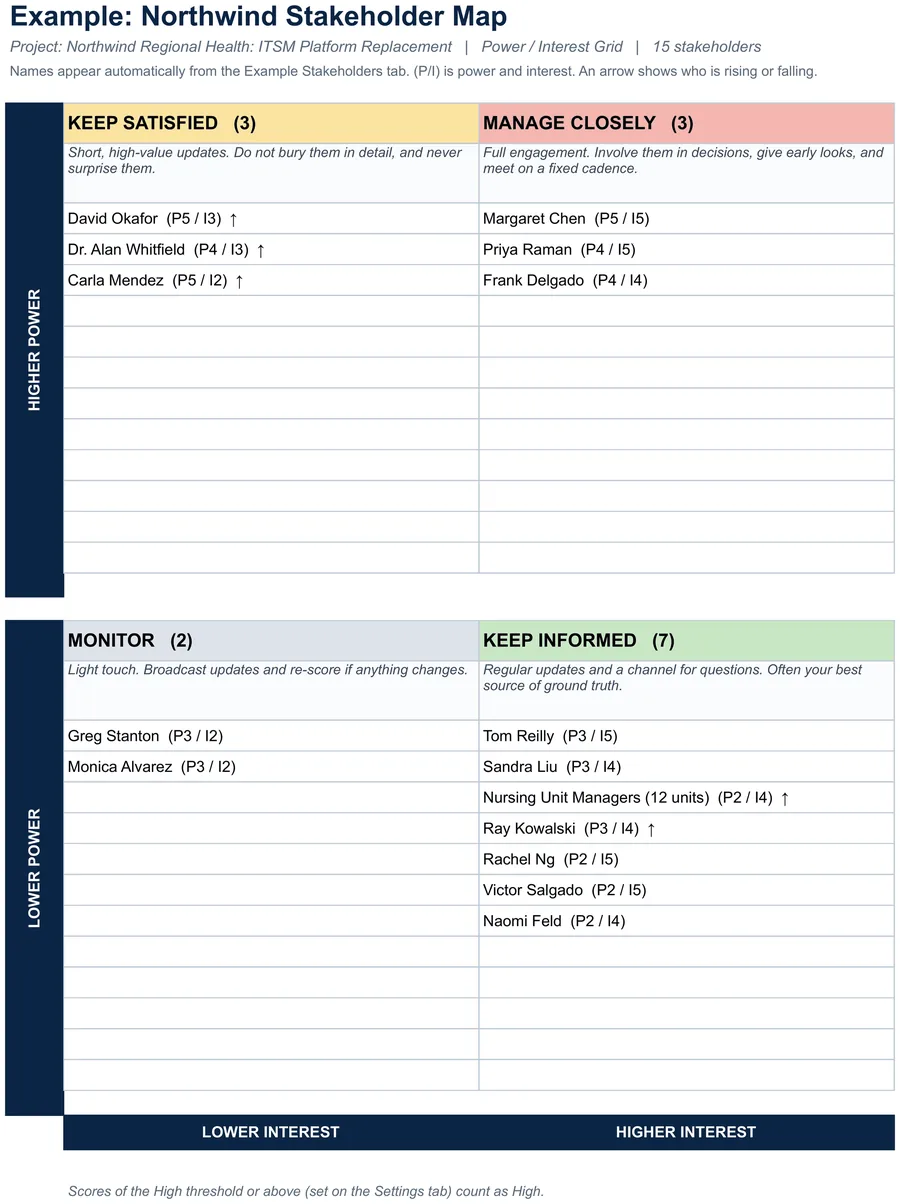
Score each person for power and interest from 1 to 5 and the map puts them in Manage Closely, Keep Satisfied, Keep Informed or Monitor automatically. Change a score and the person moves. An arrow shows who is rising or falling.
- Stakeholder Map. The grid places every stakeholder in a quadrant automatically, with their scores.
- Stakeholders tab. 100 rows for name, title, power, interest, movement and notes. Quadrant and the suggested approach fill in on their own.
- Settings. Status date, project name, the High threshold, the quadrant playbook and the power and interest scales.
Also included in Complete Toolkit ($99), Initiation and Planning Pack ($49), Executive Reporting Kit ($27).
Includes a How to Use guide tab. The green Example tabs stand alone and can be deleted. Licensed for use by the individual purchaser on their own projects.
See the Stakeholder Map in action
A quick tour of the workbook, narrated by Cassandra Taylor, PMP: what goes in, what calculates for you and what the Stakeholder Map tab shows.
Read the transcript
A list tells you who your stakeholders are. A map tells you where to spend your time, and who you can safely leave alone.
I'm Cassandra Taylor, and this is the Stakeholder Map. One workbook, in Excel or Google Sheets, that places every stakeholder on a power and interest grid for you.
Score each person from one to five, for power and for interest. The scales are written out, so two people scoring the same stakeholder land in the same place. Set your High threshold once, and the whole map follows.
The map places each person in their quadrant as you type. Here, fifteen stakeholders land across four boxes, with three in Manage Closely, and seven in Keep Informed.
Every quadrant comes with a playbook. Manage Closely gets full engagement every week. Keep Satisfied gets short updates each month. Keep Informed gets a regular channel, every two weeks. Monitor gets a light touch, each quarter.
Arrows show who is rising. Here, five people are moving up, including the CFO and the state auditor. Re-score every month, so the map never goes stale.
You're the conductor of the orchestra. I stay ready, so I don't have to get ready, right? Add the Stakeholder Map to your cart and map your first stakeholder today.
What's inside
Tabs
How to Use, Stakeholder Map, Stakeholders, Settings, Example Map and Example Stakeholders.
How to Use
A 30-minute quick start, the four quadrants and how to keep the map alive.
Companion
Pairs with the Stakeholder Register for engagement gaps and the contact schedule.