
RAID+AD Log
$49- Excel workbook
- Opens in Google Sheets
A RAID log is the one place where everything that could knock your project off course lives in plain sight: Risks, Assumptions, Issues, and Dependencies. Most projects do not fail because nobody saw the problem. They fail because the problem was sitting in someone's head, an email thread, or a meeting note that never went anywhere official.
The A and D at the end of RAID+AD are what turn a list into a management system. Actions make sure every finding has a person and a date attached. Decisions put the why on the record, so nobody has to guess six months from now.
This workbook does one job: it makes sure nothing stays unnamed, unowned, or undated. You can't conduct what you can't see.
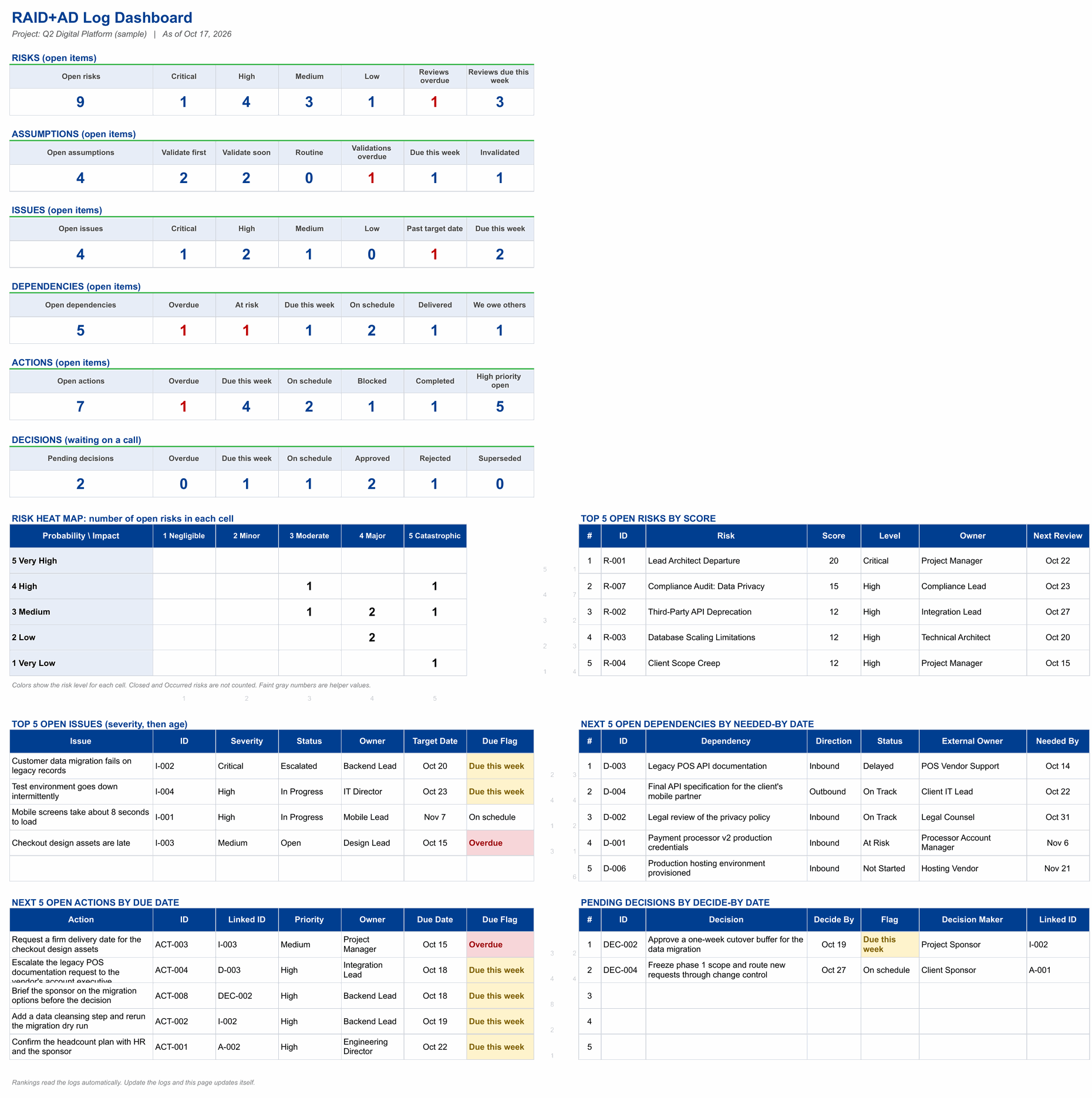
- Six-log dashboard. Open counts for risks, assumptions, issues, dependencies, actions and decisions, a probability by impact heat map, top 5 open risks and issues, next 5 dependencies, next 5 open actions by due date and pending decisions by decide-by date.
- Risks. Risk title, description, category, probability and impact from 1 to 5, status, owner, mitigation plan, mitigation owner and status, date identified, target and review dates. Risk score, level, review cycle, days until review and review flag calculate on their own.
- Assumptions. Assumption, category, owner, date logged, confidence, impact if false, what happens if it is false, validation method, validation owner, due date, status and date validated. Exposure (1 to 9), priority, days until validation and the validation flag calculate on their own.
- Issues. Issue title, description, category, severity, status, owner, date raised, target resolution date, date resolved, root cause and action plan. Days open, days until target and the due flag calculate on their own.
- Dependencies. Dependency, what we need and why, direction (inbound or outbound), type, external owner or provider, our owner, needed-by date, committed date, date delivered and status, plus impact if late. Days until needed, slip and flag calculate on their own.
- Actions. Action, linked ID, owner, date created, due date, date completed, status, percent complete, priority, source or meeting, and blocker notes. Days until due and the due flag calculate on their own.
- Decisions. Decision, context (why it is needed), options considered, rationale, decision maker, decide-by date, date decided, status and impact (what changes). Days until decide-by and the flag calculate on their own.
- Mitigation Log. One row per mitigation step, linked to a risk ID, with owner, target date, actual completion, status, percent complete, due flag, blockers and evidence.
- Settings. Status date and project name, risk level thresholds and review cycles, probability and impact scales, assumption scoring, issue severity targets, and the dropdown lists, with four blank slots for your own categories.
Each log holds 100 items. Includes a How to Use guide tab. Licensed for use by the individual purchaser on their own projects.
What's inside
How to Use
The six logs in plain English, a 30-minute quick start, how the logs link to each other, and a weekly 20-minute review.
Linked IDs
Every item gets an ID the moment you type a title, and a Linked ID column fills in the linked item's title so you can see how everything connects. Any item can lead to an action or a decision.
Upgrade path
The top of the ladder: everything in the RAID Log and the Risk Register, plus Actions and Decisions. See the ladder.